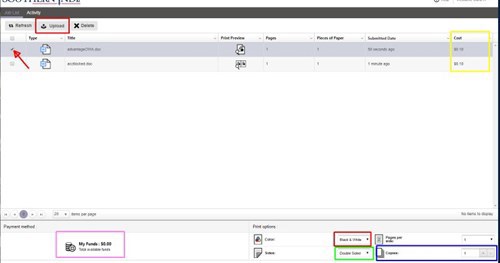
Log in with your myUSI credentials. This brings up My Print Center, your personal print queue.
Click the "Upload" button on the upper left side.
Browse to your document and choose it. You should see it in your queue.
Select the checkbox to the left of your document
At bottom right choose B&W or color, front and back, number of copies. The printing cost will appear to right of document name.
Log Out of My Print Center (top right) * If you see an error screen, you may have to go to Advanced and click "proceed to website anyway". The site is safe, but there might be a certificate error.
2. Print the document
Go to a Printer from this list (use the workstation near the printer)
Sign in to My Print Center with your myUSI username and password
Click the print button on the right side of the screen.