1. Open the Settings app.
2. Go to WiFi settings.
3. eduroam should be listed as an available network.
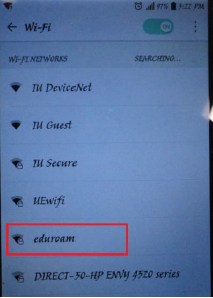
4. Click on eduroam, a dialog box should open up.
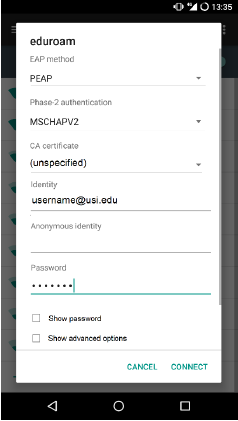
5. Enter the following in the dialog box:
-
- For EAP Method leave it set to PEAP.
- Set Phase 2 Authentication to MSCHAPV2.
- If you have issues connecting to eduroam first try connecting again, if the problem persists try changing Phase 2 Authentication to None.
- Leave CA Certificate blank or (unspecified).
- For Identity enter your USI email address.
- If you have an aliased email you must enter your original email account username and not the alias (i.e. username1@usi.edu rather than first.last@usi.edu).
- Leave Anonymous Identity blank.
- For Password enter your USI email password.
- Click the Connect button.
- If you are prompted to enter a username and password reenter your USI email address and the password.